

Someone stole a credential for ConnectWise Cloud Backup (formerly SkyKick), a multi-tenant Entra app, and used it to sign in as the app to customer Microsoft 365 tenants. On October 21, Microsoft attributed the campaign to Storm-0940, a China-state-aligned actor, using the agentic framework ARTEX.
App-only sign-ins have no user behind them. No MFA prompt, and user-scoped Conditional Access doesn't apply. Whatever the app was already consented to is what the token can reach.
In two tenants Huntress reviewed, a ConnectWise Cloud Management app gave itself Global Administrator, then planted new secrets on other apps. In the first, client secrets that expire in 2028 went onto two apps, one of which belonged to a security vendor.
ConnectWise disabled its seven app identities on October 17. That stops new sign-ins through those apps. It does nothing about credentials planted on other apps in your tenant, and you'll have to find those yourself. I'd start with service principal sign-ins, then go to the Entra audit log for self-assigned roles and credential additions made by an app.
What happened, in order
This timeline uses only what the vendors and researchers have published. Times are UTC.
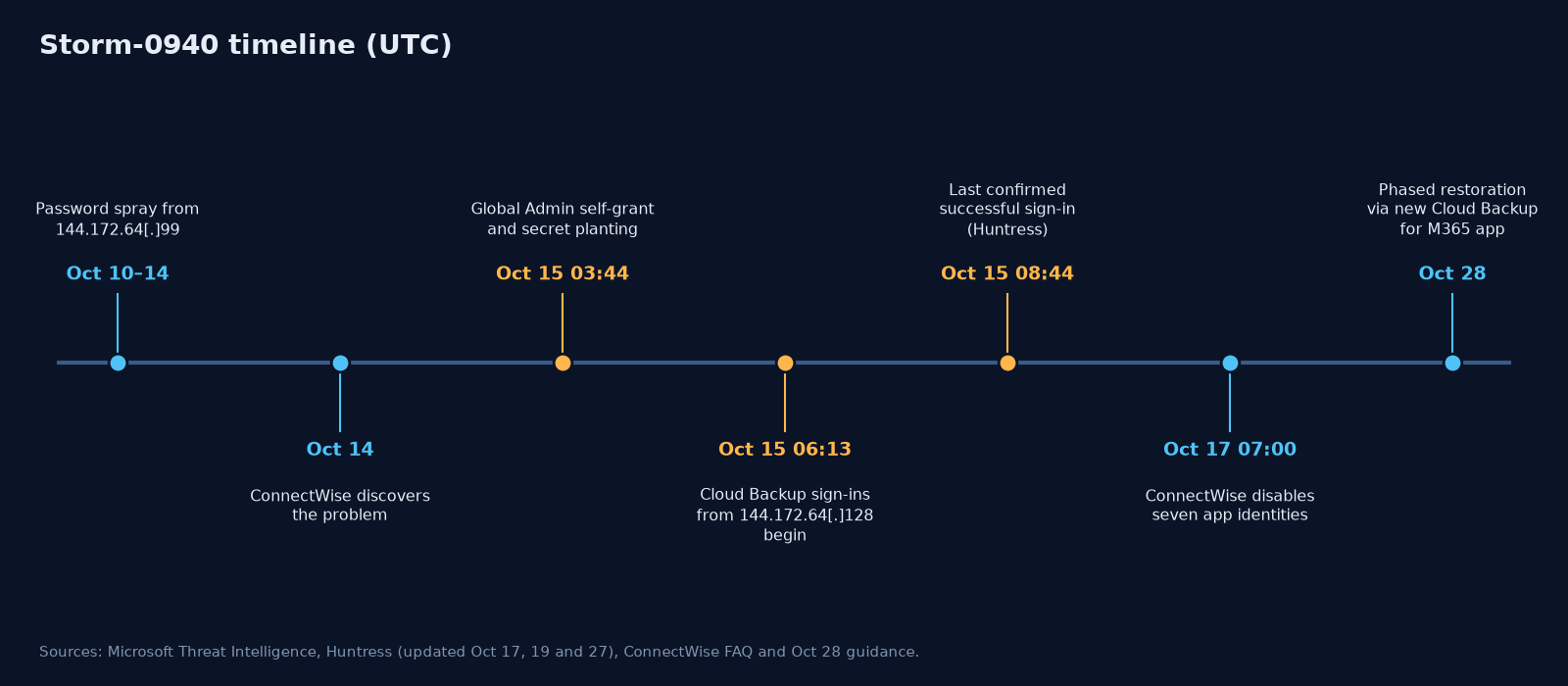
- Oct 10–14: Microsoft observed an automated password spray from 144.172.64[.]99 against 327 accounts at eight organizations. It produced more than 151,000 failed logons and peaked at 2,900 failures per minute on October 11. Microsoft saw no successful authentication from it.
- Oct 14: ConnectWise's FAQ says this is when it discovered the problem.
- Oct 15, 03:44–03:48, the role grab: In one tenant, ConnectWise Cloud Management – MS Teams (
24205314-2b89-4e07-a2a4-579e898a5640) added itself to Global Administrator at 03:44 and again at 03:48. - Oct 15, 03:44–03:49, secret planting: In the same window, a script with the user agent
Python-urllib/3.12made nine changes to two other apps in that tenant: an MSP management app and Huntress's own app. Six succeeded and three failed. One of the failures was a certificate Microsoft rejected for a thumbprint mismatch, and the new client secrets, set to expire in 2028, went through. Huntress later found the same pattern in a second tenant at around the same time. - Oct 15, 06:13–08:34: The Cloud Backup app identity signed in from 144.172.64[.]128 and received Graph tokens. It worked through tenants in sorted GUID order. Huntress's last confirmed successful sign-in with the credential was at 08:44. It later counted almost 1,000 tenants with sign-in activity from that IP, more than 300 of them successful. Huntress also saw a second, targeted and unsuccessful wave that day against 16 tenants in the policy, national-security, trade and critical-minerals sectors, most of which didn't run ConnectWise at all.
- Oct 17, 07:00: ConnectWise disabled seven application identities and revoked the certificates used by the affected connections.
- Oct 21: Microsoft attributed the compromise to Storm-0940. It said ARTEX-driven agents attempted sign-ins to more than 2,250 tenants, and in some environments followed up with Graph reconnaissance, application credential changes, and changes to identities, groups and privileged roles.
A caution if you're building a timeline from this: Huntress traced the 03:44 credential additions to private Azure IPv6 space, the same range legitimate ConnectWise traffic uses, not to 144.172.64[.]128. It hasn't tied that phase to the operator behind the 06:13 sign-ins. Microsoft's attribution covers the campaign. I'd still record the two phases separately in any case timeline.
Why app-only access walks past MFA and Conditional Access
Most identity controls assume a human is signing in. App-only authentication, the OAuth client-credentials flow, has no human in it. The app proves its identity with a secret, a certificate, or a signed client assertion. Entra then issues a token carrying whatever application permissions the tenant admin consented to.
For the Cloud Backup sign-ins, Huntress notes the credential was a client assertion, so the credential lived in the vendor's tenant and nothing the customer did could have produced it. So:
- No user, no second factor.
- User Conditional Access doesn't apply. ConnectWise's own guidance points out that Conditional Access for workload identities covers single-tenant service principals registered in your tenant. It doesn't cover third-party multi-tenant SaaS apps.
- Backup permissions are wide. A backup product needs read access to mail, files, Teams and the directory, and write access to restore. A stolen backup credential gets all of that, in every tenant that consented.
The Global Admin self-assignment
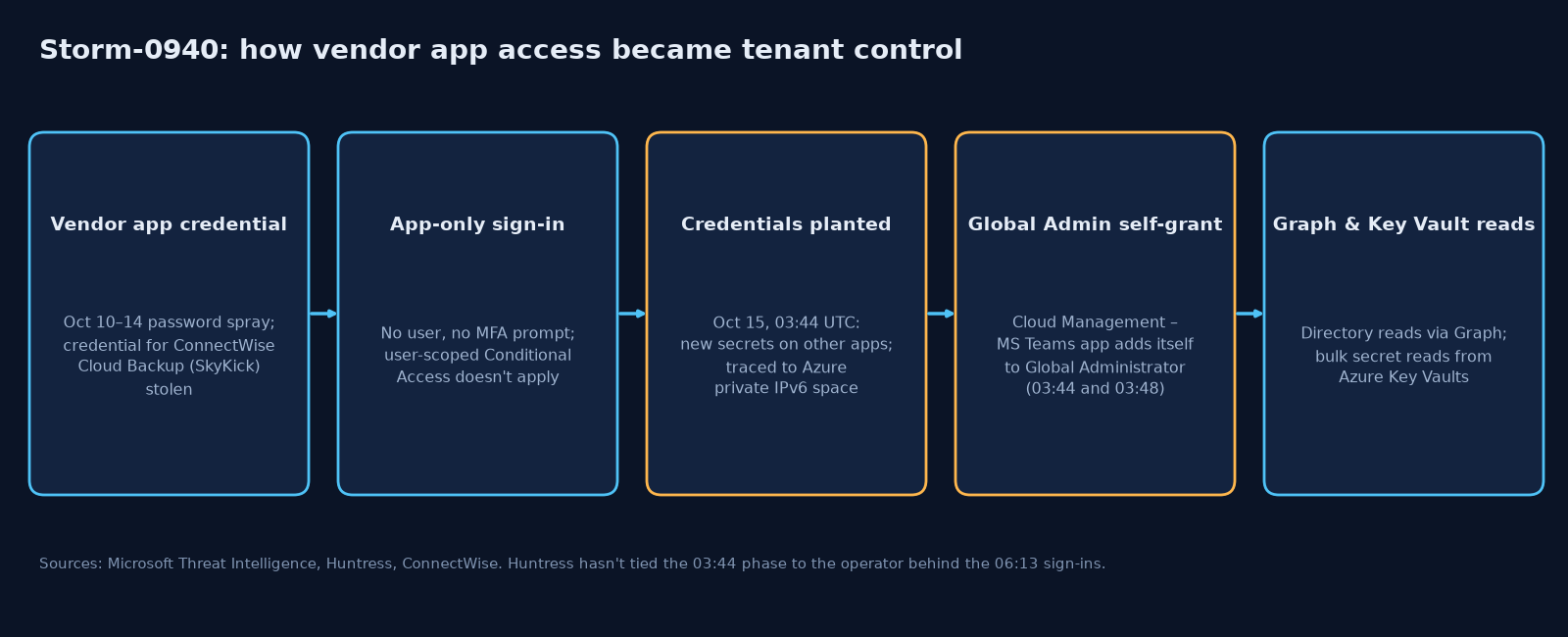
The privilege escalation was simple: an app that already held a role-assignment permission used it on itself. In the audit log this shows up as Add member to role, with the initiator and the target being the same service principal. Microsoft now ships a Defender alert for this pattern, Application self-assigned Global Administrator role.
Huntress also saw ConnectWise Cloud Management service principals assign themselves directory roles, mostly Exchange Administrator, in about 50 tenants from 01:58 UTC on October 15. Those events carried the kiota-dotnet user agent that the vendor's own apps use, and Huntress says that points to vendor automation, but it hasn't confirmed that with ConnectWise.
Secrets that outlive the vendor's fix
For responders, this is the part that matters most. Once an attacker is Global Administrator, the vendor credential is only one way back in. Huntress saw new secrets planted on other apps registered in the tenant. After finding a second tenant with the same pattern, Huntress assessed that the choice of apps looked random: they were apps registered in the tenant, picked regardless of how much privilege they held. A secret on an MSP management app is especially dangerous because that app may be consented into the MSP's customer tenants.
ConnectWise is clear about the limits. Disabling its app identities blocks new authentication through them, but it doesn't undo changes already made inside a tenant, and access tokens issued earlier may stay valid until they expire. Microsoft makes the same point: credentials added to applications can keep working as a backdoor after the original app has been remediated.
What you can't see
Be upfront in your reports about what the logs can't tell you:
- Directory reads through Graph don't show up in the Entra audit log. Huntress notes that Graph directory reads leave no audit record. Microsoft notes that a successful authentication alone doesn't prove data was accessed. Neither statement proves nothing was taken.
- App-only actions in the Entra audit log carry no source IP. The log also doesn't record the details of the credential that was added.
MicrosoftGraphActivityLogsonly helps if it was switched on before the incident.- Retention: Entra Free keeps sign-in and audit logs for 7 days, and P1/P2 for 30. Upgrading the license doesn't bring back expired history.
ATT&CK mapping
| Technique Observation | |
| T1199 Trusted Relationship | Access to downstream tenants through a consented third-party app |
| T1195 Supply Chain Compromise | Compromised multi-tenant OAuth app (Microsoft's mapping) |
| T1078.004 Valid Accounts: Cloud Accounts | App identity sign-ins with the stolen vendor credential |
| T1528 Steal Application Access Token | Vendor app authentication material compromised |
| T1098.003 Additional Cloud Roles | Teams app self-assigned Global Administrator |
| T1098.001 Additional Cloud Credentials | Client secrets (2028 expiry) added to other apps |
| T1110.003 Password Spraying (our mapping) | Oct 10–14 spray from 144.172.64[.]99 |
| T1555.006 Cloud Secrets Management Stores | Bulk secret reads from Azure Key Vaults (Microsoft's mapping) |
| T1087.004 / T1580 Cloud Account / Infrastructure Discovery | Graph enumeration after access |
What to hunt for
None of this needs a particular tool. These are the behaviours I'd check for in Entra ID sign-in and audit logs, going back to at least October 13, and to October 1 for service principal sign-ins where you still have the logs (Microsoft's broader look-back):
- Vendor app sign-ins by source. Review every service principal sign-in by the affected ConnectWise/SkyKick application IDs, grouped by source IP, and look at successes and failures separately. Huntress observed the legitimate vendor traffic coming from Azure private IPv6 space, so public IPv4 hosting addresses stand out. Don't treat Azure private IPv6 as proof an event was legitimate, though: Huntress traced the credential additions to that same space. Microsoft also advises not limiting the review to the published IPs.
- First-seen source IPs for any service principal. A workload identity authenticating from an address it's never used before deserves a look, and this one keeps working after these IoCs go stale.
- A service principal adding itself to a directory role. An "Add member to role" audit event where the app doing the adding is also the target is a strong signal.
- Credentials added to an app by another app. Watch for new secrets or certificates on an app registration where the initiator is an application rather than a person, especially with scripting user agents such as Python or curl.
- Graph activity from the published infrastructure or user agents, if Graph activity logging was already turned on.
Microsoft describes the three 187.15.x addresses as VPN egress. They only matter for October 15–16 alongside the affected apps, so don't block them broadly. The user agents are weak on their own. As Huntress puts it, the signal is the combination of actor, operation and user agent.
What I'd do in a tenant today
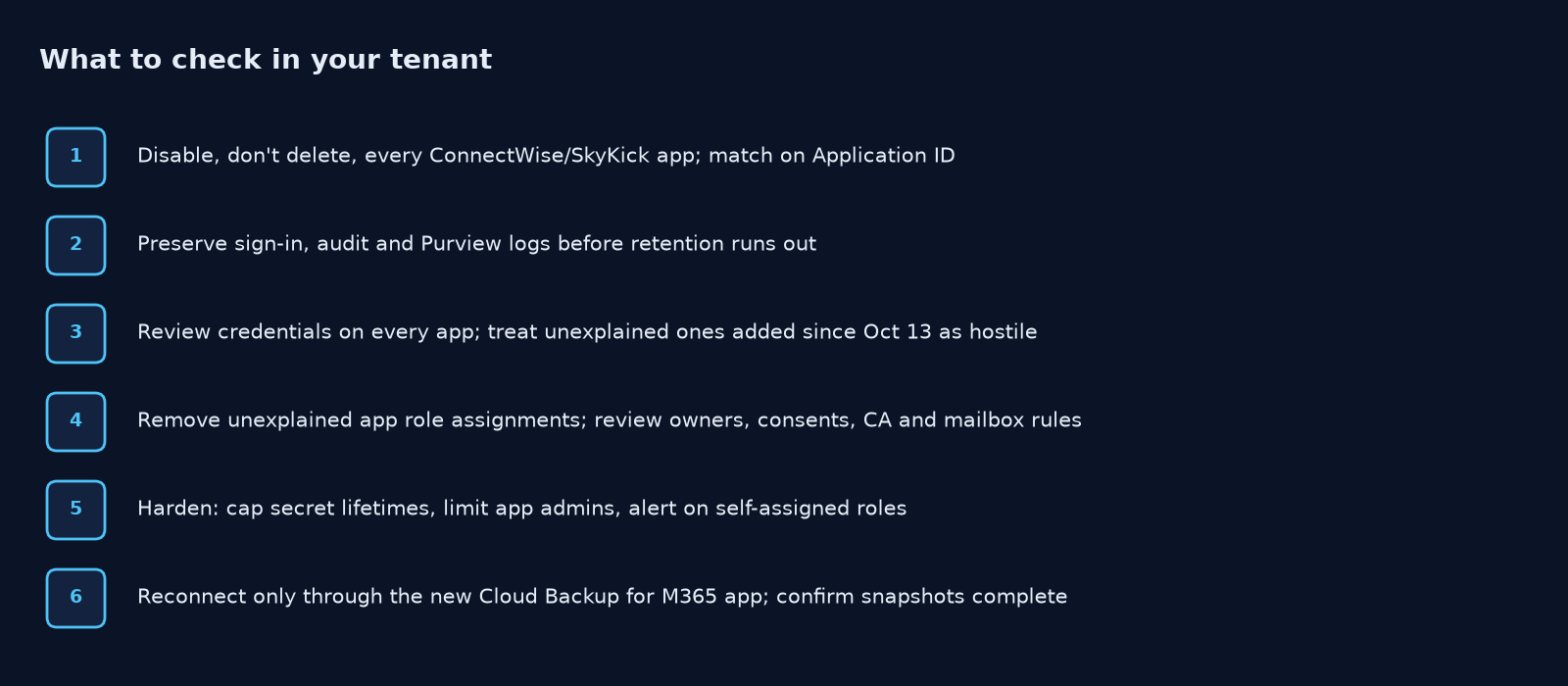
- Disable, don't delete, every ConnectWise/SkyKick app. Match on Application ID, not display name, and record the local Object ID. ConnectWise's FAQ also recommends disabling
c921256f-04a7-44e8-9b2a-69c33929ba19if you find it. - Preserve first. Export sign-in logs (interactive, non-interactive and service principal), audit logs and Purview audit data before retention runs out. Don't hold up urgent containment waiting on the exports.
- Review credentials on every app registration and enterprise app, starting with security, RMM, PSA and MSP-management tools. Treat anything added since October 13 that you can't account for as hostile.
- Remove unexplained role assignments held by apps, and review owners, consent grants, Conditional Access changes, and mailbox rules and delegation.
- Harden for the next vendor. Use app management policies to restrict secrets and cap their lifetimes, and limit who holds Application Administrator and Cloud Application Administrator. Use ID Protection for risky workload identities, and alert on service principals that assign roles to themselves.
- Reconnect only through ConnectWise's new ConnectWise Cloud Backup for M365 app, following its October 28 guidance. Keep the old apps disabled unless ConnectWise tells you otherwise, and confirm new backup snapshots actually complete, because re-authorizing alone doesn't prove backups resumed.
A consented third-party app has standing privilege in your tenant and nobody ever signs in to it interactively. Treat it like a privileged account, and make sure your detections do too.
References
- Microsoft Security Blog, Storm-0940 / ARTEX and the ConnectWise supply chain compromise (Oct 21, 2026): https://www.microsoft.com/en-us/security/blog/2026/10/21/storm-0940-uses-artex-agentic-ai-connectwise-supply-chain-compromise/
- Huntress, vendor credential (ConnectWise/SkyKick) abuse in Microsoft 365 tenants (Oct 16, 2026; updated Oct 17, 19 and 27): https://www.huntress.com/blog/vendor-credential-enables-unauthorized-access
- ConnectWise Trust Center, Cloud Backup advisory, technical investigation guide and FAQ: https://www.connectwise.com/company/trust/advisories
- MITRE ATT&CK: